Without one role, professions stay in separate groups and their numbers are not directly comparable.
1. Check dossier completeness first
Start in AI profiles with all run statuses. Scores appear only for a current assessment of a complete dossier; an old sparse run remains audit history only.
- Keep Run status set to All run statuses.
- When the row says Awaiting complete dossier, collect rate, availability, scope, timing, workflow, personal contribution, and at least three case references.
- Select exactly one profession or find a person by name / handle.
- Sort by individual fit, current-project fit, or communication — highest first.
- Select Open candidate card for the required person.
AI profiles shows individual and current-project fit separately. Portfolio / work-sample quality remains a third independent AI lane in the card.
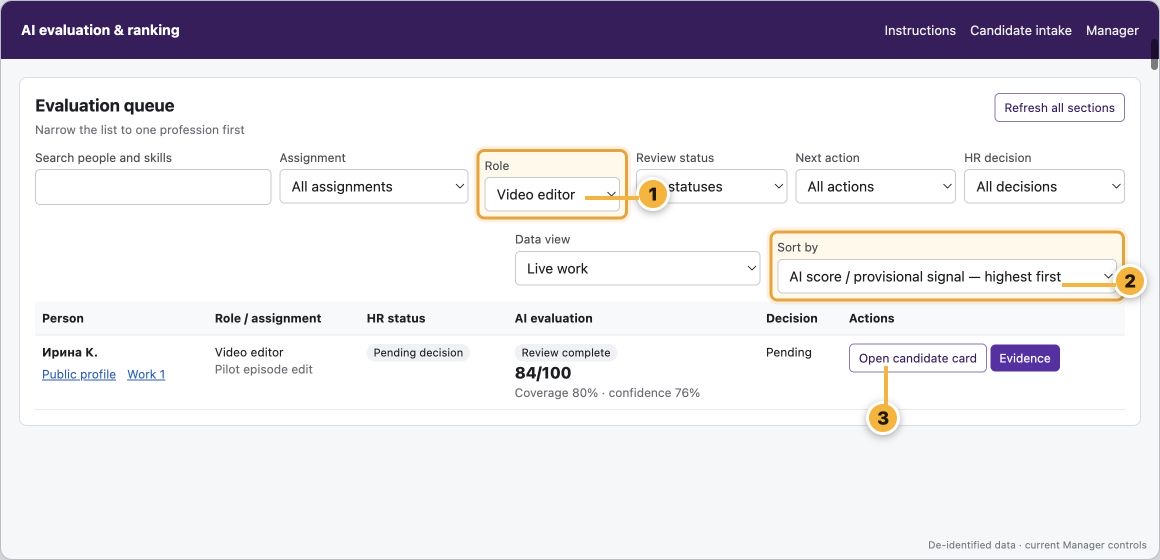
- Select one required profession.
- Put the highest AI score / signal first.
- Open the first card and verify its sources.
2. Read what the candidate actually supplied
The card combines declared data, structured facts, exact messages in the original language, and public work links.
- Declared details contains skills, seniority, languages, rate, and other submitted claims.
- Normalized / system facts are a readable extraction from captured sources only.
- Exact candidate messages · original language preserves the source text instead of translating it with the interface.
- Public profile and work open separately; private conversation locators are never published.
- When no public cases are available, the card explicitly tells the manager to contact an administrator.
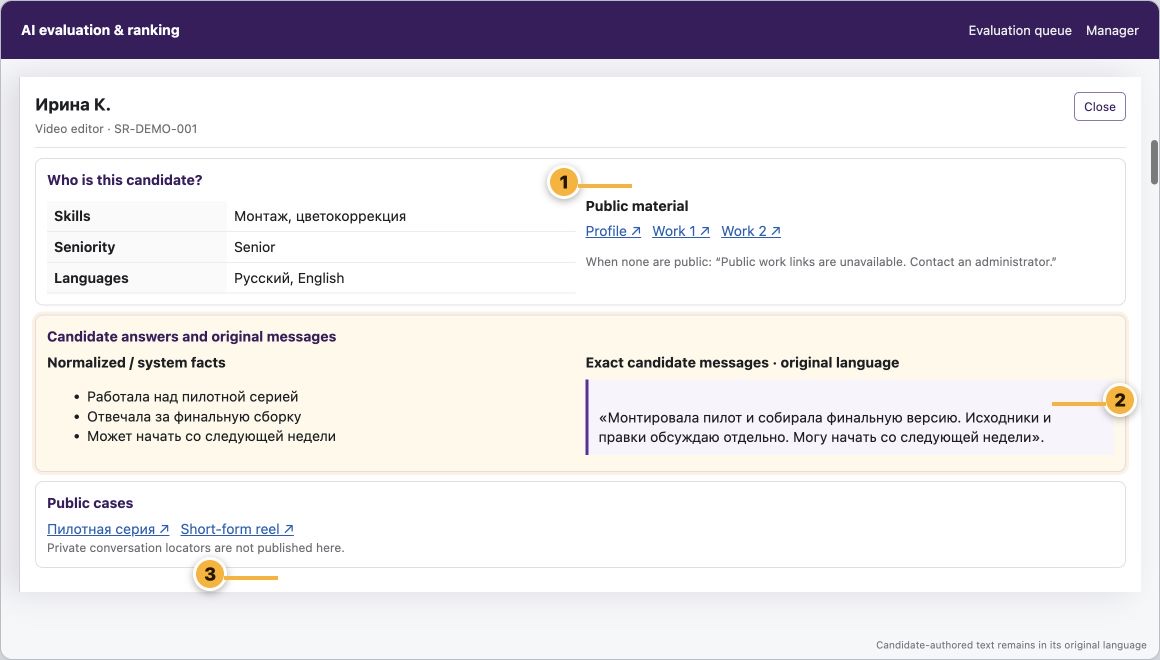
- Check declared data and available public material.
- Read the exact message instead of replacing it with a summary.
- Open public cases to verify authorship and quality manually.
3. Check the rate, service prices, and case budgets
The candidate card has a dedicated Commercial terms block. It shows the submitted amount and currency, structured service prices, and actual case budgets when those facts were genuinely captured.
- Read Declared rate first: this is the amount and currency HR entered from the candidate's statement.
- Under Structured prices, check the from/to range, currency, and unit: hour, day, project, or minute of output.
- Open a price record and verify its source, candidate-language wording, included scope, and confirmation state.
- Use Actual case budgets for completed-work costs; do not substitute them for the current rate.
- When terms are agreed, select Record a decision → Approve a rate and enter amount, currency, unit, and agreement source; the saved card then shows Approved rate in force.
- Compare candidates only inside one role and with the same currency and price unit.
Price is a commercial fact and never changes the AI quality score. A missing price means no captured data, not zero or free work. Administrators can inspect the same source records in Prospect catalog under Prices and Cases.
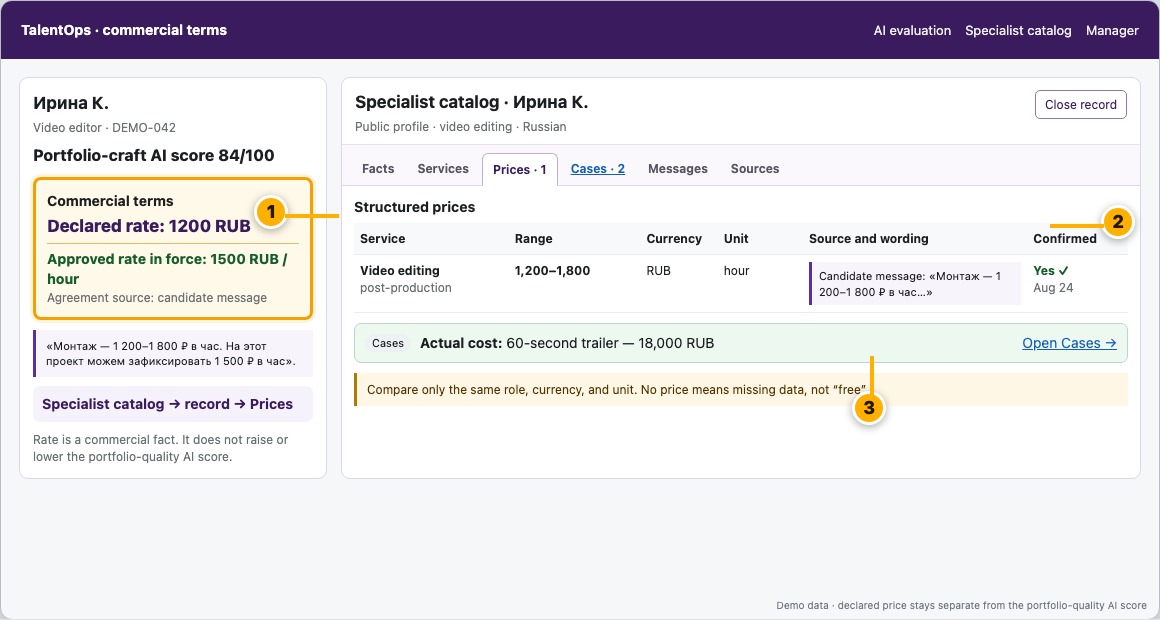
- Start with the candidate-submitted amount and currency.
- Verify range, unit, source, and exact wording.
- A completed-case budget is not the current rate.
4. Follow the five-step AI explanation
In the AI section, expand Why this score?. The large number is meaningful only with coverage, criteria, confidence, and limitations.
- Check which evidence entered the assessment and what was missing.
- Separate confirmed facts from claims that the work does not prove.
- Read every criterion, subscore, weight, and rationale.
- Read the result with confidence and limitations; missing evidence is not scored as zero.
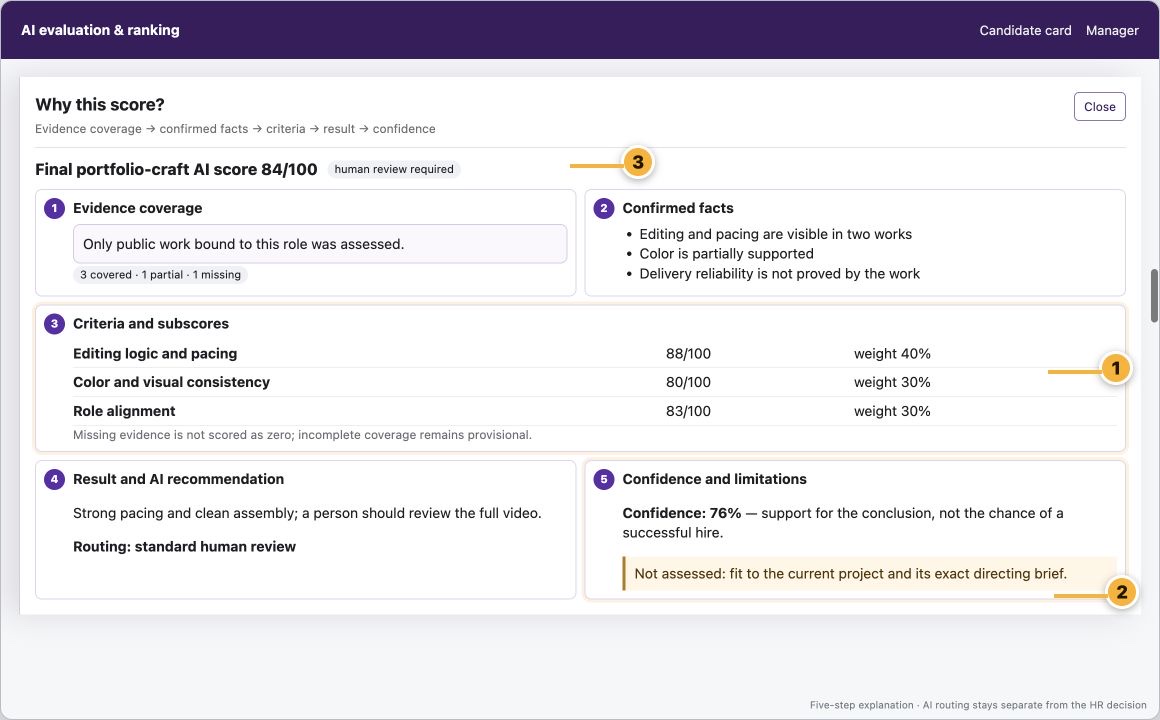
- Criteria and weights make the result traceable.
- Confidence measures evidence support, not hiring probability.
- A final score still requires human review.
5. Refresh without spending tokens again
Ordinary use of an existing assessment does not create a provider request. Only an explicit action starts another one.
- Role, Sort by, Search, filters, Previous/Next, and Refresh use saved data.
- A historical run of an incomplete dossier remains visible for audit but its score is not used in ranking.
- Run completed applies only to the complete-dossier version named by that result.
- Showing cached assessment means the complete dossier is unchanged: the successful result is reused without a new AI request. A changed complete dossier receives a separate current assessment.
- Evaluate fit to current project queues only missing project-fit runs; changing the current brief creates a new current assessment without replacing individual AI.
- Re-evaluate with latest source context creates a new assessment and may make a new paid request.
- Use Retry AI evaluation / Retry failed run only after a real failed/cancelled run, not to refresh the screen.
If an assessment already exists, select Refresh and read its status before considering Re-evaluate.
6. Compare with the project and record a decision
The card shows the current brief and a separate AI assessment of fit to that exact project. Individual fit and portfolio quality remain unchanged.
- Verify the title and brief under Current project.
- Expand Why this project score? and read criteria, confidence, and limitations.
- Compare the result with original answers and public work; use a test task when evidence is insufficient.
- Select Open materials, then Record a decision.
- Choose the outcome, add a specific rationale, and verify that the current decision changes.
No AI score creates a hire or reject decision by itself.
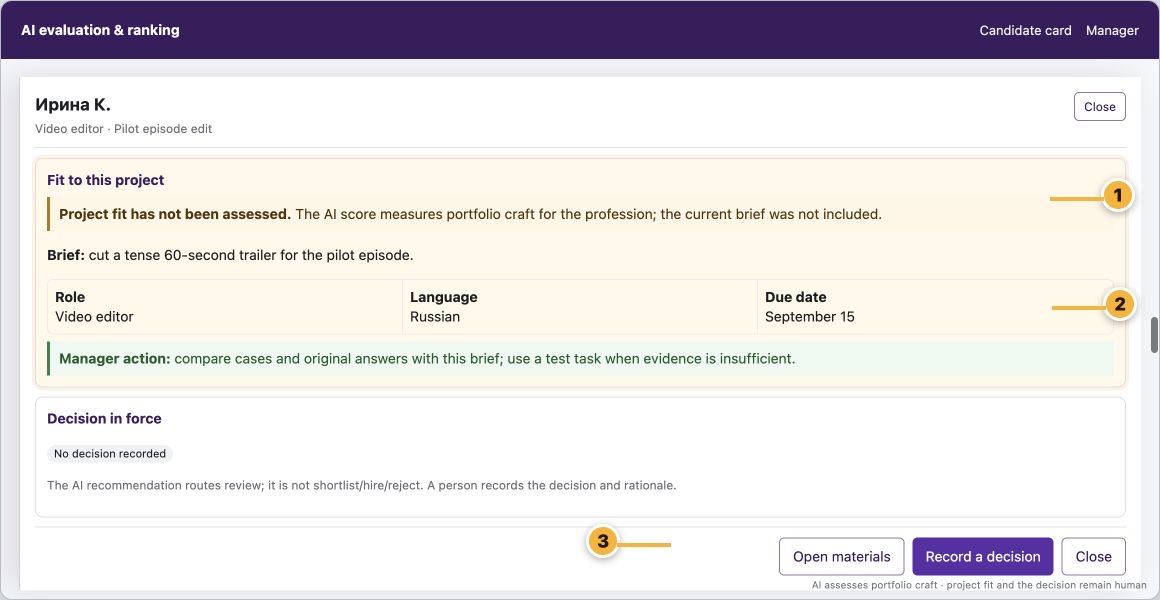
- Do not mix individual, project-fit, and portfolio scores.
- Verify the project-fit rationale against original answers and cases.
- Open materials first, then record a human decision and rationale.
For administrators: queues, links, and storage
- Only complete profiles in the verified admitted set can enter the AI queue; other catalog records are not processed.
- Portfolio evidence · linked projects accepts allowed public HTTPS sources; private pages, temporary attachments, and ZIP files do not qualify.
- Downloaded video and extracted frames are deleted after analysis; URLs, results, limitations, and run audit data remain.
- Wait for queued/running; read the failure code for failed/cancelled; use human review for succeeded results with low coverage.
Before a staffing decision
- One exact role is selected.
- Original candidate messages were read and public work was opened.
- Rate, currency, price unit, source, and available case budgets were checked.
- Why this score? was expanded and coverage, criteria, confidence, and limitations were checked.
- The separate project-fit assessment and current brief were checked.
- A repeat assessment was not started without a reason.
- A person recorded the decision and rationale.